Skip to content

Learning path

Learning to program is learning to solve problems.

Written to be read in order, from the first question to the complete kiosk.

See the path
parts
7
lessons
41
exercises
224
of practice
~25 h

The path

7 parts, one staircase.

Each part opens with a question about how to think and most close with a project about the kiosk: 5 in total. Open a part to see its lessons and the problem each one starts with.

  1. Starting from zero

    What a problem is, the first program and how to know whether it is right.

    4 lessons · ~1 h

    See its lessons
    1. 0.1Your first problemHow many pizzas should we order for the party?
    2. 0.2Giving data a nameChange the guests in a single place
    3. 0.3Ask before computingSplitting the bill at the canteen
    4. 0.4When something goes wrongThree tip calculators that fail
  2. Imperative and structured

    Giving orders to a machine with memory

    What if a program were a list of orders that keep changing what is in memory?

    9 lessons · ~5 h

    See its lessons
    1. 1.1DecidingThe price of a cinema ticket
    2. 1.2Many pathsIs this a leap year?
    3. 1.3Repeat while neededLucía's money box
    4. 1.4Repeat a known number of timesIs this number prime?
    5. 1.5Many values under one nameThe hottest days of the week
    6. 1.6Search, count and filterThe heat waves
    7. 1.7Boards and gridsWho won at noughts and crosses?
    8. 1.8More than one wayGuessing a number in few questions
    9. P·IProject: the kiosk tillThe day's receipt
  3. Procedural and modular

    Divide and conquer

    What if a big program were built from small pieces, each one with a name and a job?

    8 lessons · ~5 h

    See its lessons
    1. 2.1Splitting the problemThe teacher's report card
    2. 2.2What each part seesThe balance that does not double
    3. 2.3Functions that touch nothingA price that cannot be added up
    4. 2.4Problems that contain themselvesThe tower of Hanoi
    5. 2.5Giving data a shapeThe group's contact list
    6. 2.6When something can failSigning up for the workshop
    7. 2.7Big programsThe kiosk split into files
    8. P·IIProject: the kiosk in partsThe till with stock
  4. Object orientation

    Things that know and do

    What if data came with its own operations and knew how to look after itself?

    7 lessons · ~5 h

    See its lessons
    1. 3.1Things that know and doThe two vending machines
    2. 3.2Protecting what must be trueThe card with a negative balance
    3. 3.3Two names, one objectThe order that was copied wrong
    4. 3.4ContractsThe till's payment methods
    5. 3.5Inherit or composeThe yoghurt that expires and is on offer
    6. 3.6Whose job is it?The kiosk class that does everything
    7. P·IIIProject: the kiosk with objectsThe till with objects and payment methods
  5. Functional

    Computing without changing anything

    What if nothing changed? What if each value were computed only once, from others, and then stayed fixed?

    6 lessons · ~4 h

    See its lessons
    1. 4.1Computing without changing anythingThe receipt that says something else
    2. 4.2Functions that receive functionsThree loops that change in one line
    3. 4.3Functions that rememberThis week's discount campaign
    4. 4.4Data that cannot be wrongThe order delivered with no time
    5. 4.5Face to faceThree changes for three kiosks
    6. P·IVProject: the functional kioskThe day's report
  6. Concurrent

    Several things at once

    What if a program were a team of workers that move forward by turns and wait for each other when needed?

    3 lessons · ~2 h

    See its lessons
    1. 5.1Several things at onceThe tray that waits for everyone
    2. 5.2Passing messagesThe window that holds 2 dishes
    3. 5.3Whatever arrives firstThree suppliers and one order
  7. The outside world

    Talking to what lives outside the program

    Files, JSON and the internet, keeping what is computed apart from what touches the world.

    4 lessons · ~3 h

    See its lessons
    1. 6.1Keeping it for tomorrowThe stock that is lost on closing
    2. 6.2Data that programs understandThe inventory for the school page
    3. 6.3Talking to the internetThe price of imported fruit
    4. P·FFinal project: the complete kioskThe kiosk that remembers its stock
  8. The goal

    Final project: the complete kiosk

    The kiosk that remembers its stock

    See the whole path

The method

Five phases, always the same.

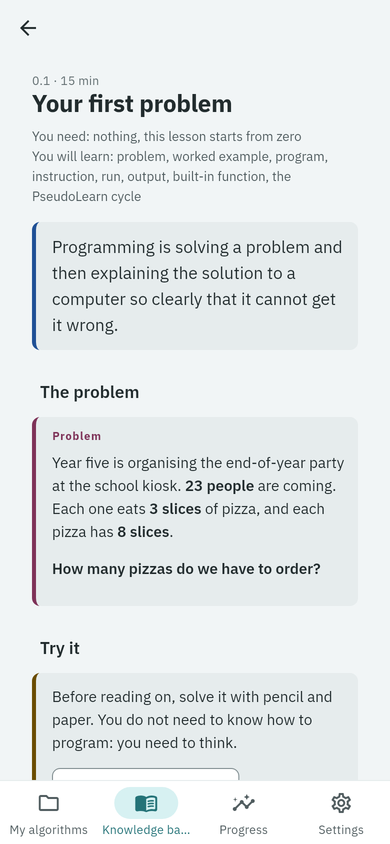
A lesson does not start with new syntax but with a problem. The PseudoLearn cycle takes you from the question to the tested program; at first it guides you through each phase, and over time you will do it without thinking.

A lesson in the app: the pizza problem, the block to try it before seeing the answer and the PseudoLearn cycle.
  1. Understand

    What you know, what you are asked and which detail of the question changes the answer.

  2. Plan

    The steps in your own words, before writing a single instruction.

  3. Write

    The plan turned into a program, analyzed by the engine as you type.

  4. Test

    Your hand-made examples against what the program really answers.

  5. Improve

    A clearer, more general or safer version than the first one.

Each lesson says what you need beforehand, what you will learn and how long it takes.

The exercises

11 ways to practice an idea.

Predicting the output, following an execution, finding the bug, breaking a program that looks right or designing the tests that catch it: each kind trains a different part of thinking like a programmer.

  • 67SolveYou write the whole program from the problem.
  • 37ClassifyYou place each value, idea or construct in its category.
  • 35PredictYou read a program and write exactly what it will print.
  • 20ExplainYou say in your own words what problem a program solves.
  • 12CompareTwo solutions that look the same: you decide how they differ.
  • 11Find the bugA program that looks right fails in one case: you find it and fix it.
  • 11Break itYou look for the input that makes a buggy program answer differently from the correct one.
  • 10OrderYou put the lines of a shuffled program in order.
  • 10ModifyYou change a working program so it does something new.
  • 7Design the testsYou write the cases that catch the buggy versions.
  • 4TraceYou fill in the trace table step by step, as on paper.

Three levels

  1. 92SeedJust enough to fix the idea.
  2. 82SproutThe idea applied to a new case.
  3. 50TreeCombines the idea with what came before.

125 of the 224 exercises are required: the ones that complete each lesson. The rest is extra practice.

Your progress

Your progress in plain sight. No grades.

The My progress panel sums up what you have done and tells you what comes next. It gives no grades and does not punish attempts: an exercise is checked, tells you what is missing and you try again.

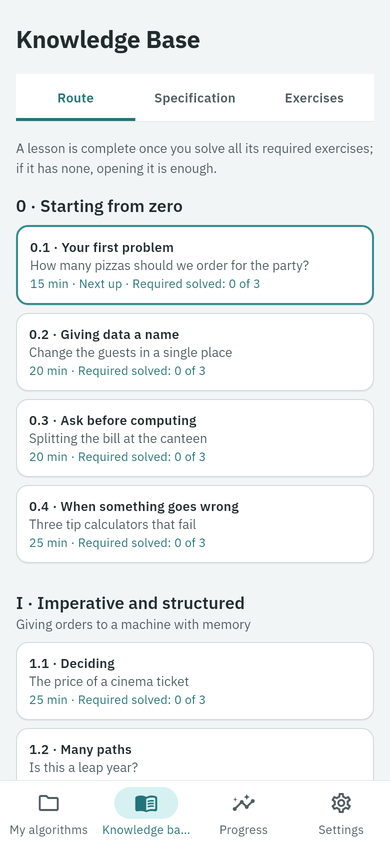
The learning path in the app: the part 0 lessons with their problem, duration and solved required exercises.
  • The path

    A lesson is complete once you solve its required exercises; if it has none, opening it is enough.

  • The exercises

    Solved by level and by kind, to see which skills you practice most.

  • The concepts

    Which constructs you already used in your own algorithms: conditionals, loops, arrays, classes.

  • The specification

    Which sections of the language your programs exercise and which are still missing.

  • The next step

    The next lesson and how many required exercises remain in the current one.

Your attempts never turn into a grade or a record that follows you around. Progress is stored on your device and, if you sign in, synced across yours.

Start from zero: 4 lessons in about an hour.

By the end you will have solved real problems, written your first programs and learned to test them. From there, the rest of the path makes sense.

Download for free

Free on the Mac App Store, the App Store and the Microsoft Store.