Skip to content

Pseudocode · macOS and iOS

Programming clicks when you can see it.

PseudoLearn runs your pseudocode one statement at a time and keeps the same step highlighted in the code, the flowchart, the structogram and the trace table. Behind it sits a 15-module path with 95 self-checking exercises.

macOS 13 or later · Apple Silicon and Intel · iOS 16 or later · Works offline

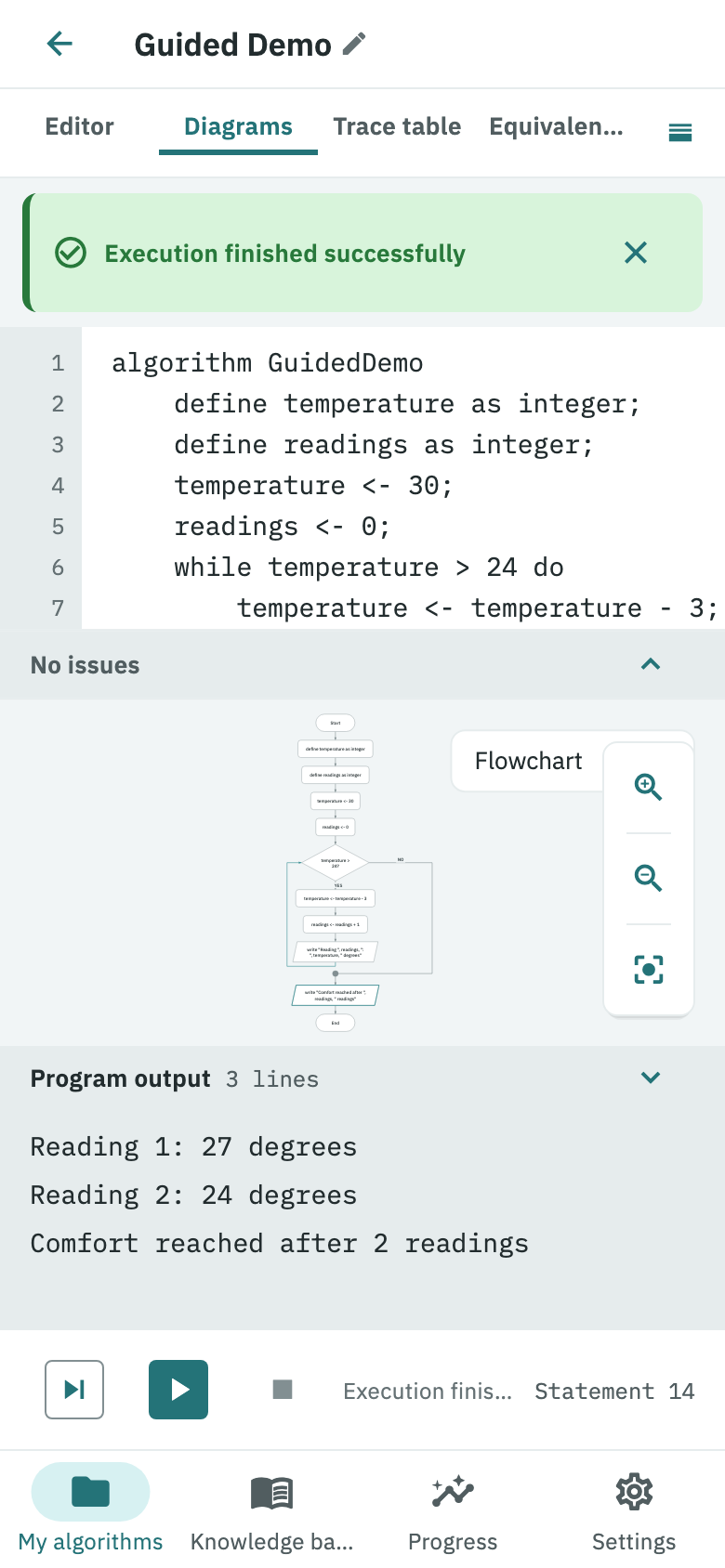
PseudoLearn with the GuidedDemo program already run: the source code, its matching flowchart and the three lines the program printed.
The same statement is marked in the code and in the flowchart. On a phone the two panels stack; on a desktop they share the width.

Availability

  • macOS13+
  • iOS · iPadOS16+
  • Windows
  • Linux
  • Android
  • in progress

Synchronized views

One step, four surfaces, no mental leap.

Almost nobody learns to program by reading a flowchart drawn by hand on a separate sheet. In PseudoLearn the four surfaces are projections of the same program, generated by the engine: when the interpreter advances, the highlight moves in all of them at once. There is also a UML class diagram when the program uses objects.

01 · Code

Statement in progress

temperature <- 30;
readings <- 0;
While temperature > 24 Do
    temperature <- temperature - 3;
    readings <- readings + 1;
    Write "Reading ", readings;
EndWhile

The statement being executed gets its own background and its number lights up in the gutter, with no cursor to hunt for.

02 · Flowchart

Active node

¿temperature >24?temperature <- temperature - 3YESNO

Drawn by the engine from the syntax tree: the shape says what the node does and the loop return uses the brand colour.

03 · Structogram

Visible nesting

¿temperature > 24?

temperature <- temperature - 3

readings <- readings + 1

Write "Reading ", readings

Nassi-Shneiderman: no arrows and no jumps, the block structure is the box itself.

04 · Trace table

One row per step

StepLinetemperaturereadings
23--
3430-
45300
56300
67270

The table your teacher asks you to fill in by hand, filled in by the interpreter. With object identity and aliasing when there are any.

Learning path

It is not a pile of tutorials. It is a path with an order.

Fifteen modules across three stages, written to be read in that order. Each module explains one idea, shows it running and closes with exercises the app checks against visible and hidden cases.

STAGE ASTAGE BSTAGE C

A · Foundations2 modules

Before writing anything: what a sequence of steps must satisfy to be called an algorithm, and the notional machine you will reason with for the rest of the path.

  • What an algorithm is
  • The notional machine

B · Structured programming8 modules

The bulk of the path: data, decisions, the three loops and when each one applies, arrays, subprograms and recursion. It closes by reading programs from their diagram.

  • Data and assignment
  • Input and output
  • Selection
  • Iteration
  • Arrays
  • Decomposition
  • Recursion
  • Reading a program

C · Objects5 modules

From loose variables to a thing with state and behaviour. It includes the point where almost everyone gets lost: identity, aliasing and what really happens when you copy an object.

  • Why objects
  • Class and constructor
  • Identity and aliasing
  • Inheritance and dispatch
  • Responsibility design
15
modules with their specification
95
self-checking exercises
86
runnable example programs
11
language specification documents

Why this and not a notebook

Six things paper cannot do.

  • 01

    Step-by-step execution, at four speeds

    The interpreter advances one statement at a time and you choose the speed. The focus moves at once in the code, the diagrams and the trace table, so you never have to guess where you are.

  • 02

    Errors that explain rather than scold

    Every diagnostic marks its exact span and the related spans too — the missing declaration, the extra EndWhile — as you type, not at the end.

  • 03

    From pseudocode to Python and Rust

    The equivalent-code tab projects your program into two industrial languages, line by line, so you can see the correspondence before making the jump to one of them.

  • 04

    Objects stop being magic

    The trace table shows the identity of each instance (Account#1) and does not collapse aliases. Seeing two names pointing at the same object settles in one step what a paragraph cannot.

  • 05

    Your programs are your files

    They are saved as .pseudo plain text, on your disk. The app works fully offline; the account and sync are optional, not an entry toll.

  • 06

    In Spanish and English, not half-translated

    The reserved words, the knowledge base, the exercises and the diagnostics all exist in both languages. Switching language changes the language, not just the buttons.

Downloads

Install it where you study.

macOSAvailable

Requirements
macOS 13 (Ventura) or later
Architecture
Apple Silicon and Intel
Version
1.0.0 · 30.3 MB · September 17, 2026
Price
Free

iPhone and iPadAvailable

Requirements
iOS 16 or iPadOS 16 and later
Input
Key bar with the language keywords
Version
1.0.0 · 30.3 MB · September 17, 2026
Price
Free

In progressWindows, Linux and Android. No announced date: they will be published here when they are ready, not before.

Start with Stage A. It is two modules.

By the time you finish the second one you will have run an algorithm step by step and read its trace table. From there, the rest of the path makes sense.

Download for macOS

Also on the App Store for iPhone and iPad